
Complete Librify Features Guide: Transform Your Library Management
Managing a library or study space in 2025 requires more than just pen and paper. Modern library owners need comprehensive library management software that handles student registrations, seat bookings, multi-shift management, payment tracking, and detailed analytics—all in one place.
Librify is a complete library management app designed specifically for private study space centers in India. Whether you're running a small single-branch library or managing multiple locations, Librify provides all the tools you need to streamline operations and grow your business.
What You'll Learn:
- Complete breakdown of all Librify features
- How each feature helps your library operations
- Free vs Mini vs Pro feature comparison
- Real-world use cases for each feature
1. Dashboard Overview: Your Library at a Glance
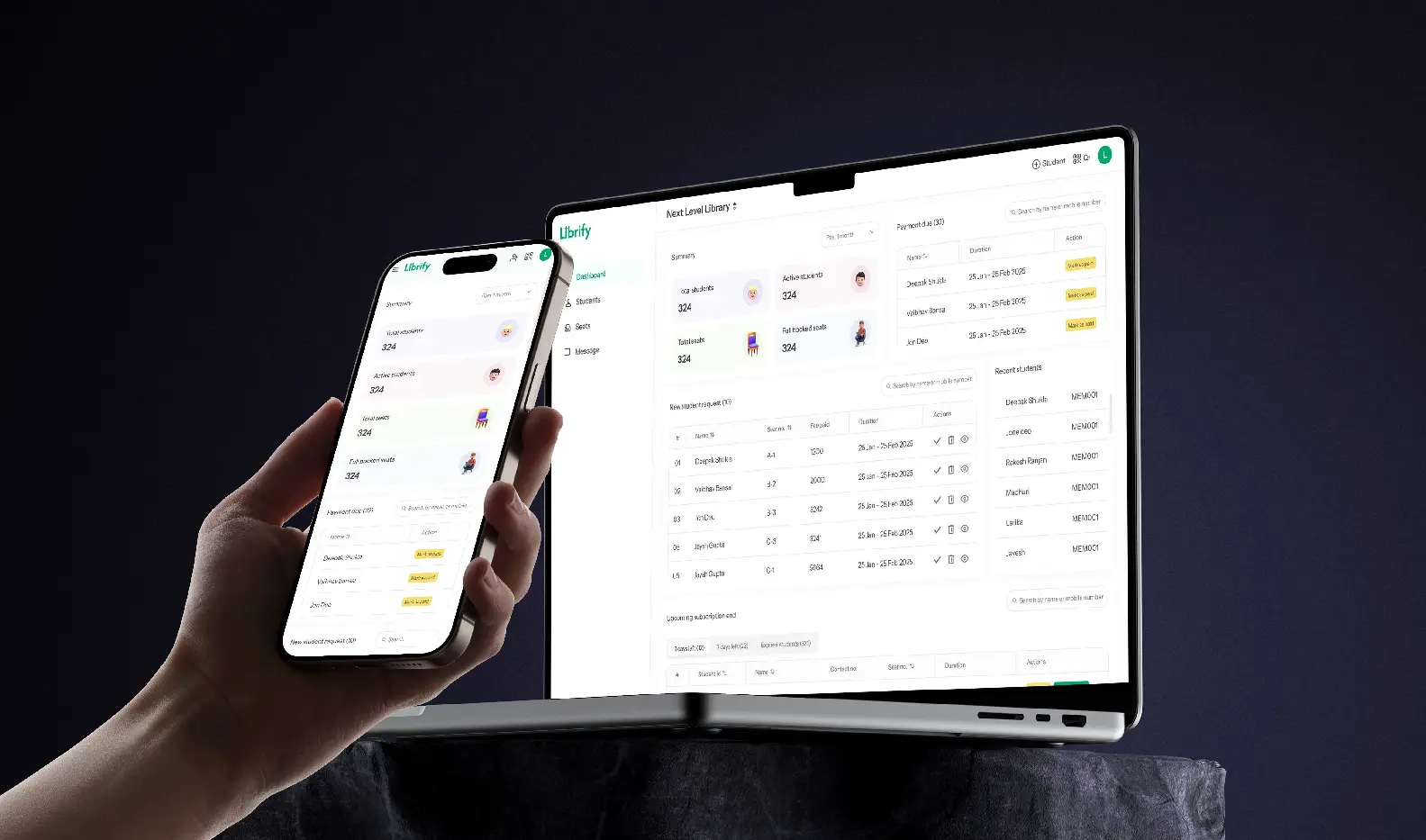
The Librify dashboard is your command center for managing your entire library or study space. It provides instant access to critical information and quick actions.
Summary Statistics
Get real-time insights into your library's performance:
- Total Students: Complete count of all registered students
- Active Students: Students with current active subscriptions
- Total Seats: All available seats across all floors
- Fully Booked Seats: Seats occupied across all shifts
Payment Due Tracking
Never miss a payment with the built-in payment tracking system. The dashboard displays a list of students with pending payments, fee due amounts, and provides quick access to payment details. This helps you maintain healthy cash flow and reduces revenue leakage.
Student Requests Management
When students register via QR code, their requests appear directly on your dashboard. You can approve or reject registrations with a single click, review pending student details, and manage the approval workflow efficiently.
Expiring Subscriptions Alerts
The dashboard automatically highlights students whose subscriptions are expiring soon, allowing you to send renewal reminders proactively and maintain consistent occupancy rates.
2. Student Management: Complete Control Over Your Database
Efficient student management is the backbone of any successful library management system. Librify provides comprehensive tools to manage your entire student database.
Student List & Database
- ✓ Complete student database with all personal and contact information
- ✓ Advanced search functionality - Find students by name, phone number, or student ID
- ✓ Filter options - Sort by status (active, pending, declined)
- ✓ Status tracking - Monitor which students are active, waiting for approval, or inactive
Detailed Student Profiles
Each student has a comprehensive profile containing:
- Personal information and contact details
- Complete subscription history with dates and shift details
- Full payment history with transaction records
- Seat assignment history showing all previous and current bookings
Student Actions
Librify gives you complete control over student management with the ability to add new students manually, edit student details anytime, view complete student history, manage subscriptions and renewals, track all payments, and even delete students when needed (with full payment tracking maintained for records).
3. Multi-Shift Seat Management: The Core of Your Operations
One of Librify's most powerful features is its advanced multi-shift seat booking system. This is what makes it perfect for modern study spaces and libraries in India.
Interactive Seat Map
The visual seat map provides a clear, intuitive view of your entire library. It shows floor-based organization, real-time seat availability, and booking status at a glance. You can quickly see which seats are available, which are booked, and for which shifts.
Multi-Shift Support (Fully Customizable)
Librify supports multiple shift types, all with customizable timings:
📅 Morning Shift
Example: 7:00 AM - 2:00 PM
Customize start and end times
🌤️ Afternoon Shift
Fully customizable timings
Perfect for afternoon study sessions
🌆 Evening Shift
Example: 2:00 PM - 10:00 PM
Popular for working professionals
🌙 Night Shift
Example: 10:00 PM - 7:00 AM
For night owl students
☀️ Full Day
Extended hours booking
Great for serious exam prep
⏰ 24 Hours
Round-the-clock access
Premium offering
Seat Booking Features
The seat booking system includes:
- Assign specific seats to students for fixed subscriptions
- Book seats for specific shifts (morning, evening, etc.)
- Full day bookings for students who want extended access
- 24-hour bookings for premium subscribers
- View seat occupancy by date
- Search students by seat number
- Filter by shift to see availability
- Filter by floor for multi-floor libraries
4. QR Code Registration: Instant Student Onboarding
One of Librify's most innovative features is the QR code-based student registration system. This eliminates paperwork and makes onboarding instant.
How QR Registration Works
- 1. Library gets unique QR code - Every library gets a unique QR code that can be displayed at the entrance
- 2. Student scans QR code - Students use their phone camera to scan the code
- 3. Mobile-friendly registration form - An easy-to-fill form opens on their phone
- 4. Submits for approval - Student fills details and submits
- 5. Library owner approves - You receive the request on your dashboard and approve/reject instantly
- 6. Student gets access - Approved students immediately become part of your system
Custom Registration Forms (Mini & Pro Feature)
With Librify Mini (from ₹59/month) or Pro (from ₹149/month), you can customize the registration form to collect specific information your library needs, including Aadhar card upload for identity verification, student image upload for security, custom form fields, and custom terms & conditions.
5. Mini & Pro Features: Advanced Library Management
Librify offers a free plan with essential features. For library owners who need advanced capabilities, the Mini and Pro plans unlock powerful tools for analytics, revenue tracking, and multi-location management.
Reports & Analytics (Mini & Pro)
📊 Daily Reports
Generate comprehensive date-wise transaction reports including:
- Payment collections for the day
- New student registrations
- Subscription renewals
- Fee due payments received
- Student deletions
- Payment adjustments
- Filter by subscription type (Fixed/Floating/All)
- Export to Excel for further analysis
📋 Today's Action Items
Start each day knowing exactly what needs attention. This feature shows students with payment due, subscriptions expiring today, subscriptions expiring in 1 day, and allows filtering by subscription type with PDF export capability.
📈 Statistics Dashboard
Track key metrics including total collection, new students total, renewal students total, due paid total, deletion total, and adjustment total.
Revenue Tracking (Mini & Pro)
Understanding your library's financial health is crucial. Both the Mini and Pro plans include comprehensive revenue tracking.
Revenue Summary Features:
- ✓ Total revenue - See your overall earnings
- ✓ UPI payments - Track digital transactions
- ✓ Cash payments - Monitor cash collections
- ✓ Other payment modes - Bank transfers, cheques, etc.
Visual Revenue Charts
Librify presents your revenue data in easy-to-understand visual formats including pie charts for payment source breakdown, bar charts for revenue trends, and monthly, weekly, and daily view options.
All Transactions Log
Access complete payment history with search functionality, filter by date range, view detailed transaction information, track payment modes, and analyze student-wise transactions.
Multi-Branch Management (Pro only)
Growing your library business? Librify Pro makes it easy to manage unlimited locations from a single account. You can manage multiple library locations, access a centralized dashboard, view branch-specific analytics, quickly switch between branches, and maintain branch-specific settings.
6. Payment Management: Track Every Rupee
Efficient payment management prevents revenue loss and keeps your library financially healthy.
Payment Tracking Features
💳 Payment Modes
- • UPI payments
- • Cash payments
- • Other modes
📝 Payment Details
- • Payment history
- • Transaction IDs
- • Payment dates
Payment Types Tracked
Librify tracks all types of financial transactions including initial payment (new student registration), renewal payment (subscription renewals), fee due payment (late payments), deletion refund (when students leave), and adjustments (corrections or modifications).
7. Subscription Management: Flexibility for Students
Librify supports different subscription types to match how your library operates.
Subscription Types
🎯 Fixed Seats
Students get assigned a specific seat number that remains theirs for the subscription period.
Best for: Students who want the same seat every day
🔄 Floating Seats
Students can sit anywhere as long as seats are available. No fixed seat assignment.
Best for: Flexible arrangements and higher capacity utilization
Subscription Features
- Set start date and end date for each subscription
- Monthly subscriptions or custom date ranges
- Automatic fee tracking
- Payment due tracking
- Expiry alerts so you never miss renewals
- Renewal reminders
- Complete subscription history for each student
8. Additional Features That Make a Difference
Responsive Design
Librify works seamlessly on mobile phones, tablets, and desktops. Manage your library from anywhere, whether you're at the library or away.
Security & Authentication
Your data security is paramount. Librify uses phone number-based OTP authentication, secure cookie-based sessions, protected routes, and data encryption to keep your library and student information safe.
Export & Reports
Export data when you need it with Excel export for daily reports, PDF export for action items, receipt generation capabilities, and invoice download options.
Free vs Mini vs Pro: Which Plan is Right for You?
| Feature | Free Plan | Mini Plan | Pro Plan |
|---|---|---|---|
| Student Management | ✅ | ✅ | ✅ |
| QR Code Registration | ✅ | ✅ | ✅ |
| Seat Management | ✅ Basic | ✅ Advanced | ✅ Advanced |
| Number of Branches | 1 | 1 | Unlimited |
| Admin/Owner Accounts | 1 | 1 | Unlimited |
| Reports & Analytics | ❌ | ✅ | ✅ |
| Revenue & Expense Tracking | ❌ | ✅ | ✅ |
| Custom Registration Forms | ❌ | ✅ | ✅ |
| Aadhar & Image Upload | ❌ | ✅ | ✅ |
| WhatsApp Fee Receipts | ❌ | ✅ | ✅ |
| WhatsApp Expiry Reminders | ❌ | ❌ | ✅ |
| Monthly Price | ₹0 | ₹59/month | ₹149/month |
| Yearly Price | ₹0 | ₹590/year | ₹1,490/year |
💡 Recommendation:
Start with the Free Plan to test all basic features. Upgrade to Mini (₹59/month or ₹590/year) for reports and revenue tracking, or Pro (₹149/month or ₹1,490/year) when you also need multi-branch management.
Frequently Asked Questions
What features are included in the free plan?
The free plan includes student management, QR code registration, basic seat management, single branch support, single admin access, basic analytics, and basic student registration form. It's perfect for small libraries getting started.
How much does Librify Mini or Pro cost?
Librify Pro costs ₹149 per month or ₹1,490 per year (save ~17% with annual billing). Pro unlocks advanced reports, revenue tracking, unlimited branches, custom registration forms, and unlimited admin accounts. Mini (from ₹59/month) covers reports and revenue tracking for a single branch.
Can I customize shift timings?
Yes! Librify allows you to fully customize shift timings for morning, afternoon, evening, and night shifts. You set the start and end times that work for your library.
How does QR code registration work?
Every library gets a unique QR code. Students scan it with their phone, fill a simple registration form, and submit for approval. You receive the request on your dashboard and can approve or reject instantly. No paperwork needed!
Can I manage multiple library branches?
Yes, with the Librify Pro plan you can manage unlimited library branches from one account. Each branch has its own analytics, student database, and settings while you control everything from a centralized dashboard.
Is my data secure?
Absolutely. Librify uses enterprise-grade security including OTP-based authentication, encrypted data storage, secure sessions, and protected routes. Your student and payment data is completely safe.
Can I export reports?
Yes, Mini and Pro plan users can export daily reports to Excel and action items to PDF. This makes it easy to share reports with partners or keep offline records.
Does Librify work on mobile phones?
Yes! Librify is fully responsive and works perfectly on mobile phones, tablets, and desktops. Manage your library from anywhere.
Ready to Experience All These Features?
Start with our free plan and upgrade anytime
No credit card required • 5-minute setup • Customer support available
Conclusion: Complete Library Management in One Platform
Librify provides everything you need to run a modern, efficient library or study space. From instant QR code registration to multi-shift seat management, comprehensive payment tracking, and advanced analytics—all features are designed specifically for Indian library owners.
Whether you're just starting with a single location or managing multiple branches, Librify scales with your business. Start with the free plan to explore core features, and upgrade to Mini (from ₹59/month) or Pro (from ₹149/month) when you need advanced capabilities.
Stop managing your library with pen and paper. Experience the power of modern library management software today.