
Introduction: The Hidden Leak in Library Profitability
Running a successful private library or self-study reading room in India is a rewarding business. However, many owners focus solely on increasing student memberships (revenue) while ignoring the silent leak: untracked operational expenses. Small, unaccounted costs—like minor repairs, bulb replacements, high-speed internet overages, or tea for staff—can quickly add up, eating away at your hard-earned profits.
To maintain a healthy profit margin, you need complete visibility into every rupee entering and leaving your business. That is where robust library expense management comes in. In this guide, we will break down the common operating costs of study rooms in India, explain why manual bookkeeping fails, and show how digital tools like Librify help you track and optimize your budget in real time.
The Anatomy of Library Operating Costs (Common Expenses)
Operating a library or study centre involves a mix of fixed and variable expenses. Understanding this breakdown is the first step toward effective expense optimization:
1. Fixed Expenses
- Rent / Lease: Usually the single largest fixed cost, ranging from ₹10,000 to ₹1,00,000+ per month depending on location and carpet area.
- Staff Salaries: Wages paid to librarians, receptionists, or cleaning staff managing different shifts.
- WiFi / Internet Subscription: High-speed unlimited fiber connections (often with backup lines) crucial for study environments.
2. Variable Expenses
- Electricity Bills: Highly variable, peaking in summer months due to continuous Air Conditioning (AC) usage. This typically represents the second largest operating cost.
- Cleaning & Maintenance: Regular supplies (hand sanitizers, floor cleaners, trash bags) and toilet maintenance.
- Repairs & Replacements: Servicing AC units, fixing broken chairs, electrical rewiring, or swapping dead lights.
- Marketing & Ads: Printing pamphlets, putting up banners, or running local social media ads to attract students.
- Stationery & Supplies: Register notebooks, printer ink, and drinking water jars (dispensers).
Why Manual Registers Fail in Expense Tracking
Many traditional library owners still write daily expenses on paper registers or maintain simple spreadsheets. While this seems convenient initially, it quickly fails as your library grows:
- Zero Audit Trail: If you hire staff, you have no way to verify who logged an expense or check if the remarks are accurate.
- Manual Calculation Errors: Totals, averages, and trend numbers have to be compiled manually, leading to mistakes.
- No Cash vs. UPI Breakdown: In India, students pay via both Cash and UPI. If you pay local vendors, matching cash-on-hand with bank statement UPI entries becomes a nightmare without a ledger.
- No Historical Trends: You cannot easily see if this June's electricity bill was higher than last June's, making budgeting difficult.
Introducing Librify Expense Management: Features Built for India
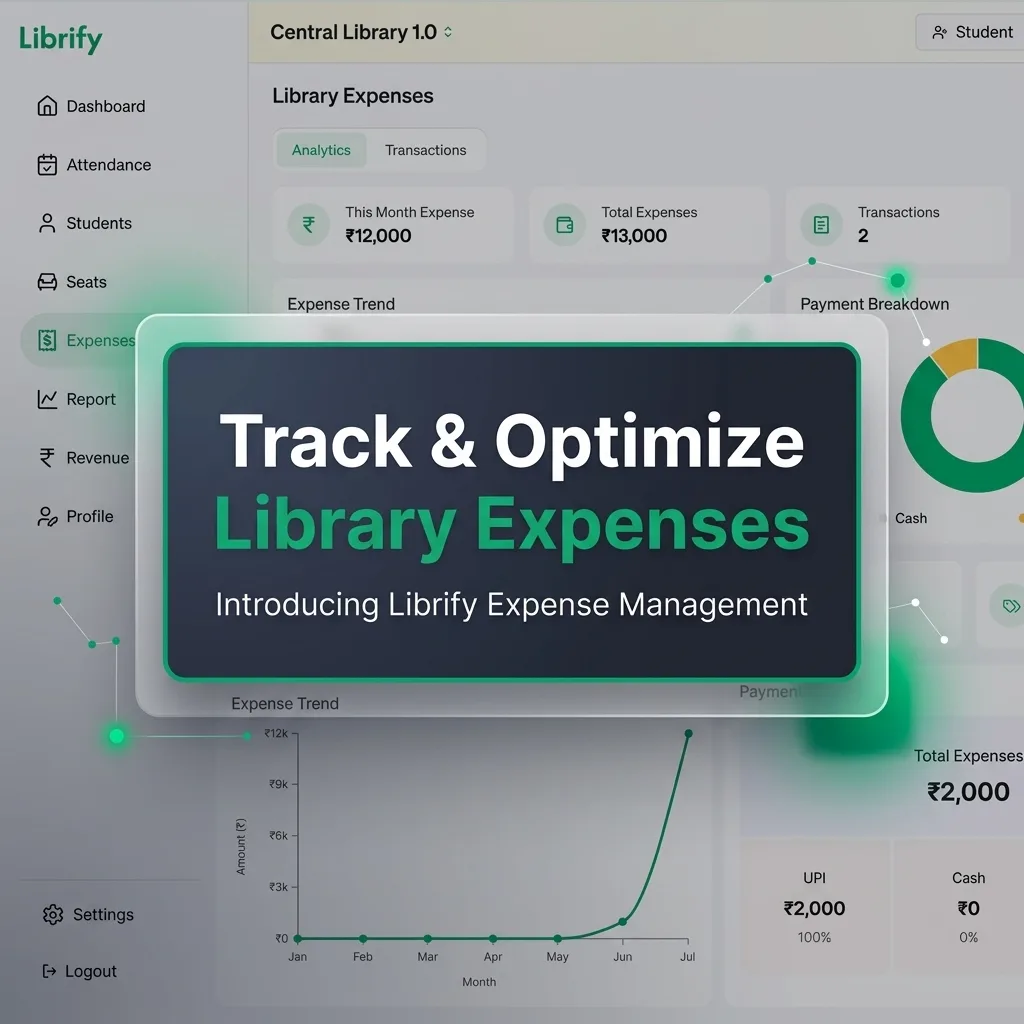
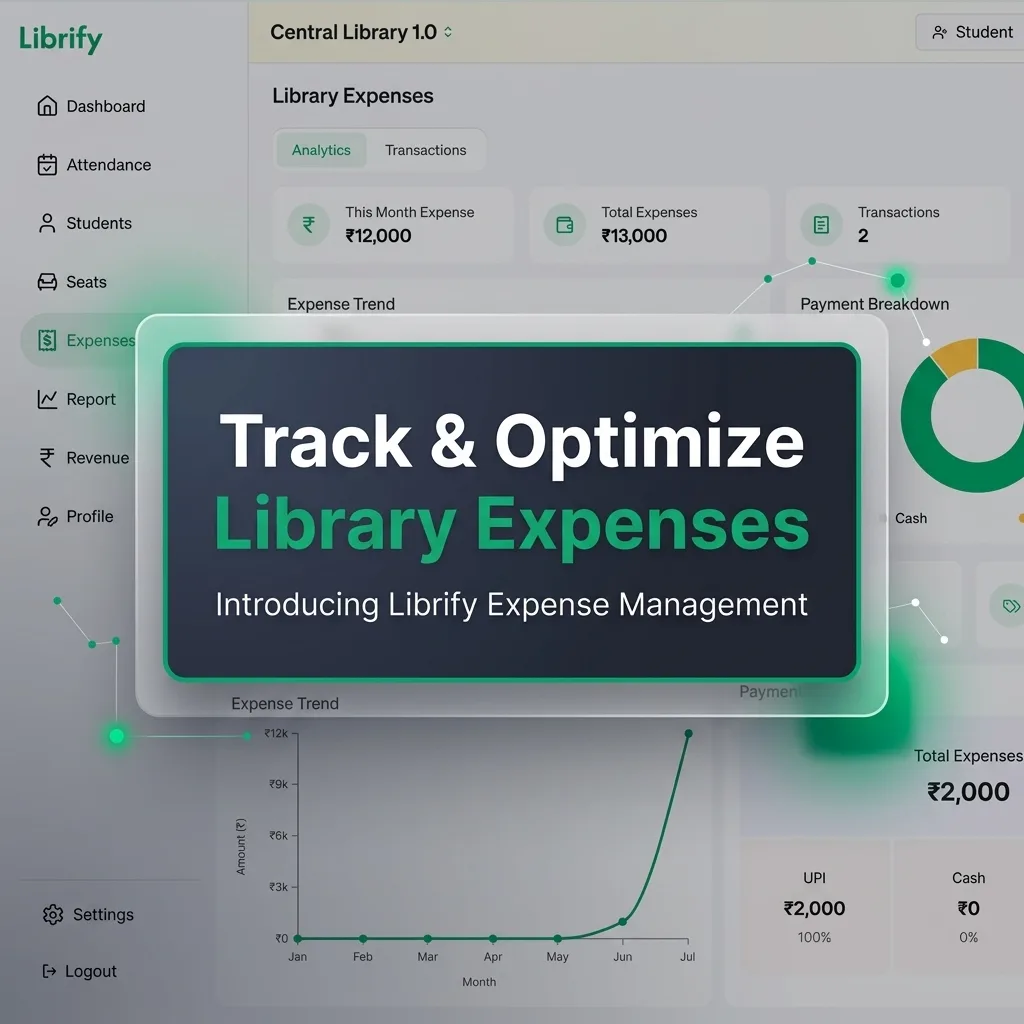
Librify's newly launched Expense Management module brings all your outbound transactions under a single, unified digital screen. Designed specifically for Indian library owners, the system includes key features:
🏷️ Multi-Category Tagging
Tag expenses under predefined categories like Rent, Electricity, Internet, Cleaning, Staff Salary, and Repairs. This categorizes your spending automatically.
💳 Cash, UPI & Wallet Tracking
Record how you paid. Librify tracks Cash, UPI, Cards, Net Banking, and Wallets so your accounts match your physical cash box and bank passbook.
👤 "Added-By" Tracking
See exactly who entered which expense. Every transaction logs the username of the staff or owner, keeping your employees accountable.
📈 Visual Analytics & Trends
Get clean line graphs representing monthly trends alongside pie charts breaking down UPI vs. Cash expenses for quick, visual audits.
Step-by-Step Guide: How to Add & Manage Expenses in Librify
Adding an expense in Librify takes less than 30 seconds. Here is how it works:
- Navigate to Expenses: Click on the Expenses tab in the sidebar menu of your Librify dashboard.
- Click "Add Expense": Located at the top right of the screen. A modal window will open.
- Enter Title and Amount: e.g., "June AC Servicing", and input the exact amount in Rupees (₹).
- Select Expense Type: Choose the appropriate category (e.g., Repairs, Staff Salary, Utilities) from the dropdown list.
- Choose Payment Mode: Select whether the amount was paid via UPI, Cash, Wallet, Net Banking, or Cheque.
- Add Remarks (Optional): Write down any helpful notes (e.g., "Paid to plumber Suresh").
- Save: Click Save. The expense is added, and the analytics charts update immediately.
5 Proven Strategies to Reduce Library Operating Costs
Tracking expenses is the first step; optimizing them is the next. Use these 5 battle-tested strategies to lower your monthly costs:
-
✓
Install Motion Sensors: Auto-turn off cabin lights and toilet fans when students leave. This simple step can shave up to 15% off your monthly electricity bill.
-
✓
Optimize AC Usage: Keep AC thermostats at a fixed 24°C. Running ACs at 18°C consumes up to 24% more power without making the study cabins significantly more comfortable.
-
✓
Audit Internet Plans: WiFi is critical, but are you paying for excess bandwidth? Check your peak active usage on Librify and choose a corporate broadband plan tailored to your actual concurrent student count.
-
✓
Negotiate Bulk Supply Deals: Buy cleaning materials, printing papers, and water bottles in bulk once every quarter instead of making weekly retail purchases.
-
✓
Use Librify Multi-Shift Pricing: Align seat pricing with peak demand. Charge higher fees for popular shifts (like Morning or Evening slots) and offer discounts for underutilized times, maximizing revenue per unit of electricity used.
Daily Expense Category Breakdown: A Sample Table
A well-run library logs expenses under consistent categories every day rather than in occasional lump sums at month-end. Here's what a typical day's log looks like inside Librify's Expense module for a mid-sized 60-seat library:
| Category | Example Entry | Typical Amount | Payment Mode |
|---|---|---|---|
| Electricity | Monthly DISCOM bill (AC-heavy summer month) | ₹8,000 – ₹18,000 | UPI / Net Banking |
| Staff | Front-desk attendant daily wage | ₹400 – ₹700/day | Cash / UPI |
| Maintenance | Cleaning supplies, water jar refills | ₹200 – ₹500/day | Cash |
| Repairs | Chair fix, tube light replacement | ₹150 – ₹2,000 (as needed) | Cash / UPI |
Logging even small, sub-₹200 entries the same day they happen — rather than "remembering" them at month-end — is what makes the monthly totals in the Analytics tab trustworthy.
Monthly Reconciliation Protocol
At the end of each month, run this reconciliation routine before closing your books:
- Match cash-in-hand: Count physical cash on hand and compare it against Librify's Cash-mode expense total plus Cash-mode fee collections for the month — the difference should be near-zero.
- Match UPI/bank entries: Cross-check the UPI/Net Banking expense total in Librify against your bank statement for the same period, flagging any transaction present in one but not the other.
- Review category totals: Compare this month's Electricity, Staff, Maintenance, and Repairs totals against the previous month to catch anomalies (a sudden repairs spike, an unexplained electricity jump).
- Check "Added-By" logs: Confirm every large expense entry (above a threshold you set, e.g. ₹1,000) was logged by an authorized staff member or the owner.
- Export for records: Download the month's ledger for your own records or to hand to an accountant.
CA Tax Audit Checklist for Library Owners
If your library's turnover requires a CA-led tax audit or GST filing, having expenses organized digitally saves significant back-and-forth during audit season:
- Month-wise expense export, categorized by type (Rent, Electricity, Staff, Repairs, Marketing)
- Cash vs UPI/bank split for every expense, matching bank statements
- Revenue records (student fee collections) reconciled against the same period's expenses for a clean profit/loss view
- An audit trail of who logged each expense, useful if a CA questions a specific entry
- Original receipts/invoices for large expenses (rent, AC servicing, bulk purchases) kept alongside the digital entry, since the DPDP-safe ledger records the transaction but not always the paper proof
Maximize Your Library's Profits Today
Stop guessing your numbers. Start tracking your library rent, electricity bills, employee salaries, and payments with Librify's free plan.
Compare Librify Plans