
Student Attendance : Library Management App Librify Complete Guide
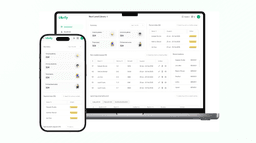
Managing student attendance in a busy Library, Reading Room, or Study Centre (PG) can be challenging in India. Traditional register-based systems are time-consuming, error-prone, and difficult to analyze. Librify introduces a powerful Attendance Tracking feature that digitizes and simplifies the entire process—available on both our web dashboard and mobile app for Indian library owners!
Whether you manage a small neighborhood reading room or a large multi-shift study center, Librify's attendance system provides real-time visibility into who's present, when they arrived, and comprehensive attendance history. It's the perfect digital replacement for your manual attendance register.
📱 Download Librify App
Manage attendance on-the-go with our mobile app. Mark attendance, view records, and track students from anywhere!
Download on Play Store
Key Attendance Features in Librify
One-Click Present Marking
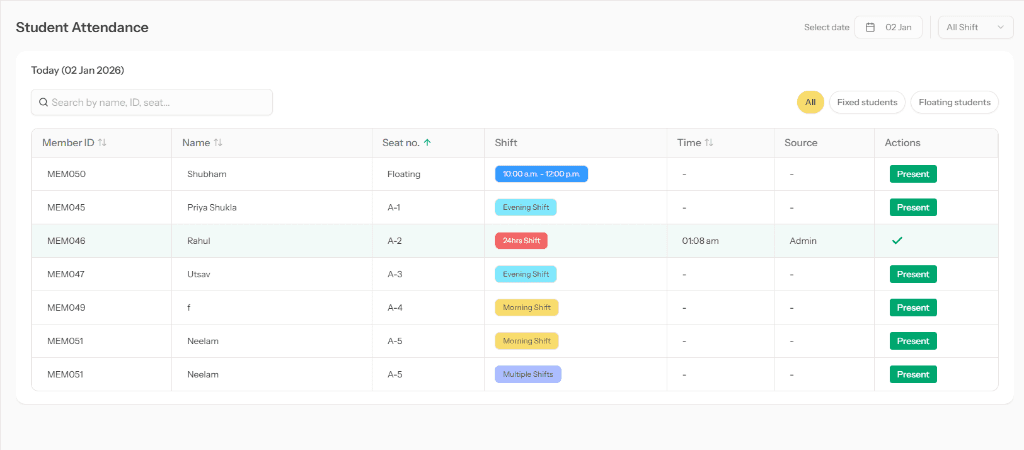
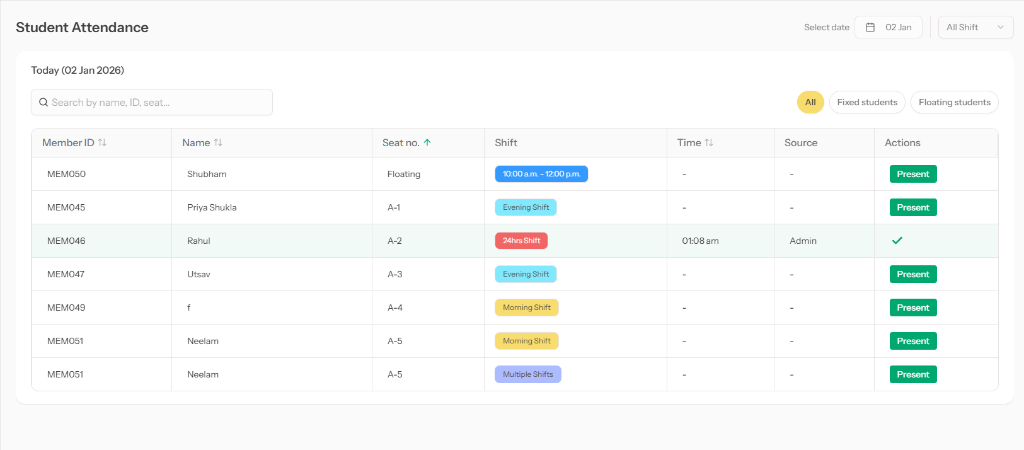
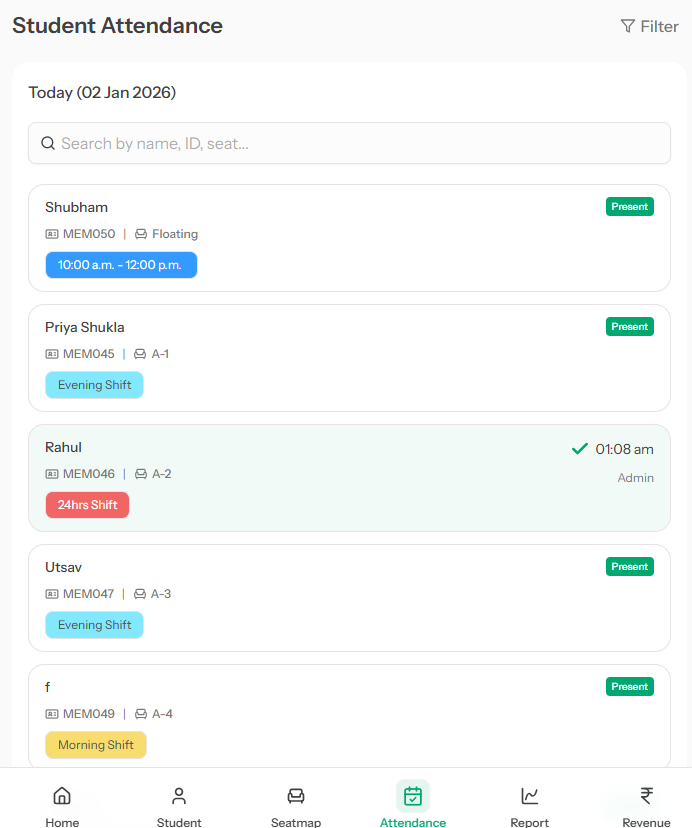
Mark any student present with a single click. See green checkmark with timestamp and source (Admin/Self) instantly.
Shift-Based Filtering
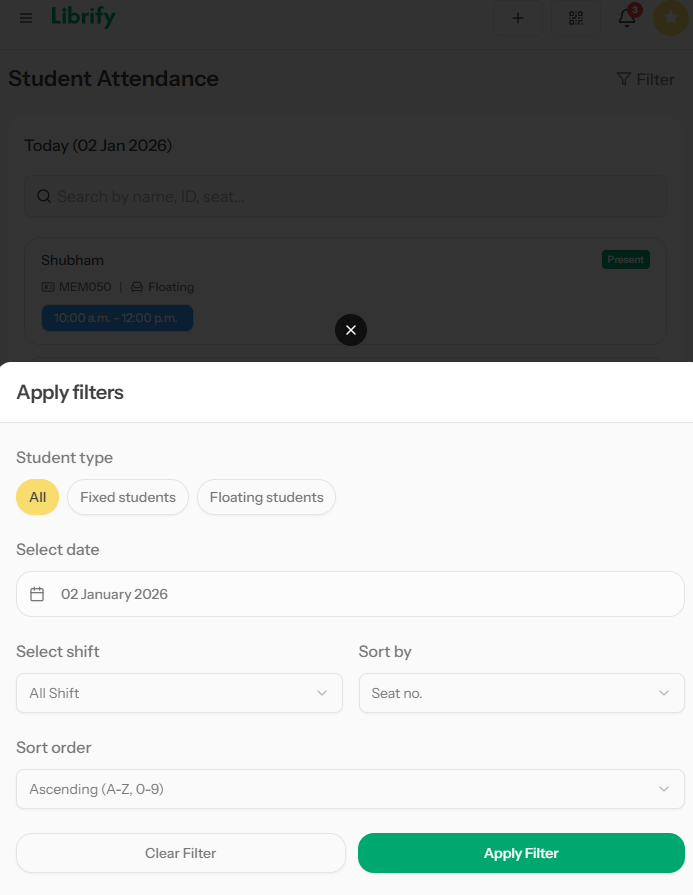
Filter attendance by shift type: Morning, Evening, 24hrs, Full Day, or view All shifts at once.
Fixed vs Floating Students
Separate tab views for fixed seat students and floating seat students for better organization.
Search & Sort
Sort by seat number, student name, or time. Essential for managing large study halls with 100+ seats.
Mobile-First Attendance Experience
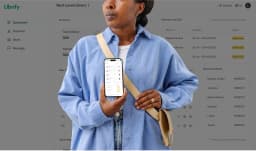
Librify's attendance feature is fully optimized for mobile devices. Mark attendance, apply filters, and manage records right from your smartphone!
📋 How to Use Attendance Tracking in Librify
Follow these simple steps to start tracking student attendance in your library:
Navigate to Attendance Page
Open Librify dashboard and click on "Attendance" from the sidebar menu (on desktop) or bottom navigation (on mobile app).
Select Date and Filters
By default, today's date is shown. Use the calendar to check past dates. Filter by Morning/Evening Shifts or toggle between Fixed/Floating students.
Search for Students (Optional)
Use the search bar to quickly find students by name, Member ID, or seat number. Great for large libraries!
Mark Present
Click the green "Present" button next to any student. The button changes to a checkmark (✓) showing the time (e.g., "01:08 am") and source (Admin).
Review Attendance Records
All attendance is automatically saved. View history by changing the date, or use sorting to organize by time, name, or seat number.
Benefits of Digital Attendance Tracking
-
Save Time
No more paper registers. Mark attendance in seconds instead of minutes.
-
Accurate Records
Digital timestamps eliminate guesswork. Know exactly when each student arrived.
-
Easy Searching
Find any student's attendance record instantly with search and date filters.
-
Mobile Accessibility
Mark attendance from anywhere using the Librify mobile app on Android.
-
Shift Management
Track attendance separately for different shifts—perfect for 24-hour study spaces.
The Real Cost of a Manual Attendance Register
Most Indian reading rooms and study centers still run attendance off a physical register at the front desk. It feels free, but the hidden cost shows up in staff time and in disputes you can't resolve. Here's a worked example based on a mid-sized 80-seat library running two shifts:
| Task | Paper Register | Librify Digital Attendance |
|---|---|---|
| Marking ~80 students present per shift | 15-20 minutes of staff time, twice a day | Under 5 minutes with one-click marking or student self check-in |
| Finding a specific student's attendance from last month | Flip through multiple physical registers | Instant search by name, seat number, or date |
| Resolving a "I was here" dispute | No timestamp, owner's word vs student's word | Exact timestamp and source (Admin or Self check-in) on every entry |
| Monthly attendance report for a parent or sponsor | Manually recompiled from the register, error-prone | One-click Excel export (Mini & Pro plans) |
Across two shifts a day, that's roughly 30-40 minutes of staff time saved daily just on marking attendance — before counting the time saved on lookups and report compilation. For a library run by a single owner-operator, that's time better spent handling walk-in enquiries or following up on due payments.
QR Self Check-in vs Biometric vs Manual Register
Librify's attendance system supports both admin-marked and student self check-in via QR code, without the hardware cost of a biometric device. A quick comparison:
- Manual register: Zero setup cost, but no timestamp accuracy and no searchability — the slowest option at scale.
- Biometric device: Accurate and tamper-resistant, but requires ₹5,000-₹15,000 hardware, ongoing maintenance, and doesn't integrate with seat/subscription data.
- Librify QR + app check-in: No extra hardware, works on any smartphone, timestamps every entry, and links attendance directly to each student's seat, shift, and subscription status in the same dashboard.
For a deeper breakdown of accuracy, cost, and setup time across all three methods, see our QR vs biometric attendance comparison guide.
"Managing student attendance and fee receipts directly via WhatsApp is super helpful."
B. Kumar, Bright Future Study Point — Lucknow, Uttar Pradesh
Verified Owner review, collected via in-app feedback. See more on our reviews page.
Common Attendance Mistakes Libraries Make Without Digital Tracking
- Treating attendance as separate from subscriptions. Without a linked system, a library owner has no easy way to see whether a student who stopped showing up also let their subscription lapse — both signals should surface together so renewal calls happen before the seat goes cold, not after.
- No record of who marked a student present. A paper register can't tell you whether the front-desk staff, a co-owner, or the student themselves logged the entry. That single "source" field (Admin vs Self) turns out to matter a lot when reconciling shift handovers or investigating a dispute.
- Losing shift-wise visibility. A library running Morning, Evening, and Night shifts off one shared register can't easily tell which shift is under-attended on a given day — data that directly informs whether it's worth adding a new shift or consolidating two into one.
- No mobile access for the owner. Many library owners aren't at the front desk all day. Without a mobile app, they have no way to spot-check attendance remotely, which means problems (a shift with no students logged in, a staff member forgetting to mark attendance) go unnoticed until month-end.
Digitizing attendance doesn't just save time — it closes these blind spots by tying every check-in to a seat, a shift, a subscription status, and a source, all visible from the same dashboard whether you're at the front desk or checking in from your phone.
❓ Frequently Asked Questions (FAQ)
Is attendance tracking available in Librify free plan?
Yes, the attendance tracking feature is fully available on the Free, Mini, and Pro plans of Librify. Library owners can mark attendance, use shift filters, and access daily records without any cost.
Can students mark their own attendance?
Yes, Librify allows students to mark their own attendance via the mobile app using "Self Check-in". The system automatically tags these entries as "Source: Self" vs "Source: Admin" for verification.
How do I filter attendance by shift in my Reading Room?
You can filter attendance by using the "Shift" dropdown menu. Options include Morning, Evening, Night, 24hrs, and Full Day splits, helping you manage students in specific time slots efficiently.
Can I download the attendance report?
Yes, Mini and Pro plan users can download detailed attendance reports in Excel format. This is useful for monthly analysis or sharing updates with parents/students.
Does attendance work on mobile app?
Yes! The Librify mobile app (available on Google Play Store) has full attendance tracking support. Mark attendance, apply filters, and manage records from your smartphone.
What is the difference between Fixed and Floating students in attendance?
Fixed students have a permanent assigned seat, while Floating students can sit at any available seat. The attendance page has separate tabs to manage both types independently for better organization.
Do I need a biometric device to track attendance accurately?
No. Librify's timestamped digital attendance (Admin-marked or Self check-in via QR) gives you the same accuracy as a biometric device without the ₹5,000-₹15,000 hardware cost, and it links directly to each student's seat and subscription data — something standalone biometric devices don't do.
Can I see which staff member marked a student's attendance?
Yes. Every attendance entry records its source — Admin (marked by an owner or staff account) or Self (marked by the student via app check-in) — along with the exact timestamp, which is useful for resolving shift handover questions or disputes.
Related Articles:
Start Tracking Attendance Today!
Free to use • No credit card required • Works on all devices
Conclusion
Librify's attendance tracking feature transforms how libraries manage daily operations. With one-click marking, shift-based filtering, and mobile accessibility, you can focus on what matters—providing a great study environment for your students.
Ready to modernize your library? Sign up for free or download the app to get started today!